Imagine vibrant green hues, earthy browns, and the delicate bloom of floral accents adorning your slides. This presentation uses a garden metaphor, visually transforming website elements into flourishing plants. Watch as clean lines of code become winding vines, databases blossom into intricate root systems, and user interfaces unfurl like petals in the sun. Gentle animations breathe life into the digital garden, showcasing growth and potential. Each slide offers a fresh perspective, inviting you to cultivate your own online ecosystem.
Categories
Generated Notes
Open by framing the website as a living ecosystem. Point to the title and set the metaphor: code are vines, databases are roots, UI are petals.
As the ground appears, describe the soil as the platform and processes that support growth—hosting, CI/CD, and team rituals.
When the stems rise, map each plant: code that climbs and connects, the database anchoring everything with roots, and the interface reaching up to users.
When the blossom appears, emphasize that value is felt at the surface—UI—yet it depends on healthy roots and steady vines.
Close with the four actions: Plan the garden layout, Plant accessible components, Prune for performance and clarity, and Pollinate through SEO and community. Invite the audience to cultivate their own digital garden.
Behind the Scenes
How AI generated this slide
Establish the garden metaphor visually with a gradient background reminiscent of a sunrise and soft, rounded shapes like dew drops.
Lay out the title and introductory text, emphasizing the 'Digital Garden in Bloom' concept with emerald green font color.
Introduce animated elements representing code (vines), database (roots), and UI (petals), using Framer Motion for smooth transitions.
Stagger the animation timings to create a sense of organic growth and draw attention to each element.
Symbolically represent the soil/foundation with an earthy-toned area at the bottom, using it later for root-like animations.
Add animated lines emerging from the soil to signify the interconnectedness of website components.
Incorporate a blossoming flower animation above the 'UI' stem to visualize the user interface as the most visible aspect.
Include a growth formula (Growth = Consistency x Care) to highlight the importance of ongoing effort.
Introduce a call-to-action section with a list of next steps ('Cultivate Next') relating to website development.
Use subtle animations (fade-in and slide-up) for the call to action to maintain engagement.
Why this slide works
This slide effectively uses the garden metaphor to create a visually engaging and memorable presentation about website development. The animation and color palette evoke a sense of growth and potential. The clear, concise text reinforces the metaphor, explaining how website elements correspond to parts of a garden. The staggered animations guide the viewer's eye and emphasize key concepts. The call to action provides practical next steps, encouraging audience engagement and application of the presented ideas. The use of Framer Motion allows for polished and performant animations, enhancing the overall user experience. The slide incorporates relevant keywords like 'website development,' 'user interface,' 'database,' 'code,' 'growth,' and 'SEO,' improving its searchability and discoverability. The blend of visuals and text creates a cohesive narrative that resonates with the audience and effectively communicates the core message.
Slide Code
You need to be logged in to view the slide code.
Questions
Frequently asked
What is the central metaphor of this slide?+
The slide utilizes a 'digital garden' metaphor to represent website development. Code is depicted as vines, the database as roots, and the user interface (UI) as petals. This metaphor helps to visualize the interconnectedness of these elements and emphasize the idea of growth and nurturing in building a successful website.
What tools or libraries were used to create the animations?+
The animations in this slide were created using Framer Motion, a popular animation library for React. Framer Motion allows for smooth, declarative animations, enhancing the visual appeal and engagement of the slide.
What are the 'Cultivate Next' steps suggested on the slide?+
The 'Cultivate Next' section outlines four key steps for website development: Plan (information architecture and sitemap), Plant (accessible, semantic components), Prune (performance, dead code, UX friction), and Pollinate (SEO, sharing, and community). These actions emphasize a holistic approach to web development, encompassing planning, implementation, optimization, and promotion.
How does the slide's visual design support its message?+
The slide's design uses a nature-inspired color palette with greens, browns, and soft rounded shapes to evoke a sense of organic growth and tranquility. The gradient background resembles a sunrise, symbolizing new beginnings and potential. The animations are timed to mimic natural growth patterns, further reinforcing the garden metaphor. This visual harmony enhances the message of nurturing a website like a living organism.
Create a slide that compares the pricing and plans for ChatGPT and Perplexity. Keep the pricing details high-level and non-committal, focusing on the availability of free and paid tiers. Include a disclaimer about checking the official sites for the latest pricing information.
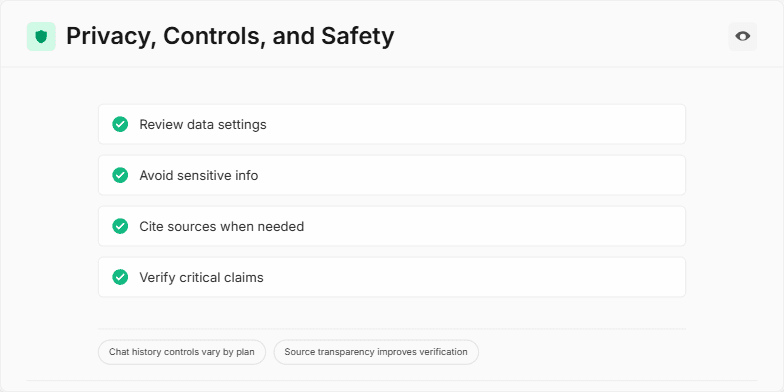
This slide emphasizes the importance of privacy, controls, and safety when handling data, especially in contexts like AI-driven conversations or presentations. The slide design includes a checklist of key practices: reviewing data settings, avoiding sensitive information, citing sources, and verifying critical claims. It visually reinforces these points with checkmarks and animations. Additional information is provided through badges highlighting plan-specific chat history controls and the importance of source transparency for verification. The overall message encourages mindful data practices for better outcomes and trust, aligning protection (shield icon) with transparency (eye icon). The accompanying speaker notes provide talking points to elaborate on each checklist item and badge, prompting audience engagement with a call for questions.
This slide uses a dramatic, dimly lit cityscape backdrop with glowing interconnected lines representing IoT devices. A single spotlight focuses on a smart home icon, pulsating with a subtle red warning glow. The color palette is dark and ominous with neon accents, creating a sense of urgency and potential vulnerability. A smooth zoom effect draws the viewer into the smart home icon, emphasizing the need for proactive security measures.
Create a slide comparing two distinct user experience (UX) workflows for question-answering: a chat-centric approach and a search-blend approach. The chat-centric workflow should prioritize a conversational flow, with tools available as secondary aids. The user interacts primarily through a chat interface, using commands like "continue," "refine," and "analyze." The search-blend workflow should emphasize a search-first approach. Users input queries, the system displays results as source cards with credibility ratings, and an assistant synthesizes the information. Users can then "follow up," "open sources," or "refine." Visually represent both workflows and highlight the typical user actions in each.
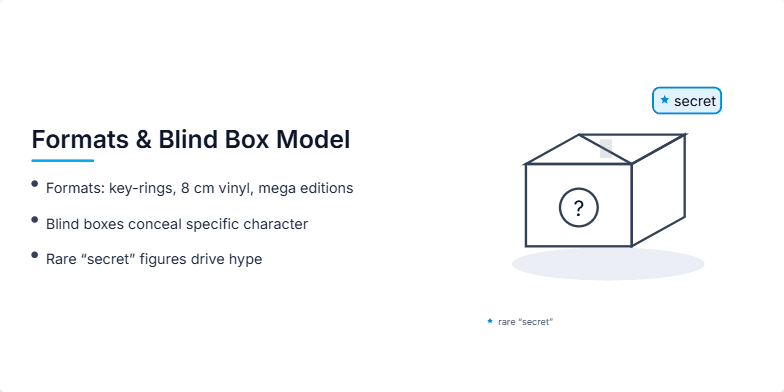
The slide explains the various product formats offered, including keyrings, 8cm vinyl figures, and mega editions, catering to different budgets and display preferences. It details the blind box model where the character inside is concealed, adding an element of surprise and maintaining consistent shelf visuals. The inclusion of rare "secret" figures within the blind boxes is highlighted as a key driver of hype, encouraging trading, repeat purchases, and social media buzz. The slide emphasizes how these formats establish a tiered value system, and the combination of blind boxes and secret figures generates sustained excitement and engagement among consumers.
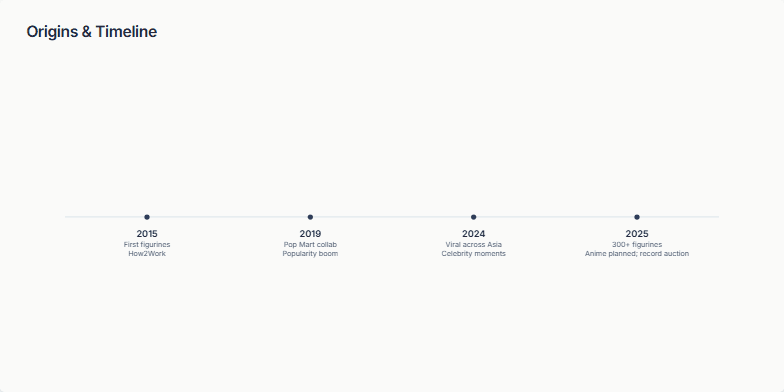
Create a slide visualizing the growth and key milestones of a figurine brand from its inception to its current status. The slide should showcase a timeline format, highlighting significant events like collaborations, viral moments, and expansion into other media like anime. The timeline should span from the brand's first figurines to its current success, including a record auction. The visual style should be clean and minimal, using a horizontal line to represent the timeline and markers for each milestone. The slide should have a title, 'Origins & Timeline,' and use a neutral color palette. The target audience is potential investors and partners, aiming to demonstrate the brand's strong trajectory and potential for future growth.
Want to generate your own slides with AI?
Start creating high-tech, AI-powered presentations with Slidebook.