Concurrent Rendering in React: Keeping UI Responsive
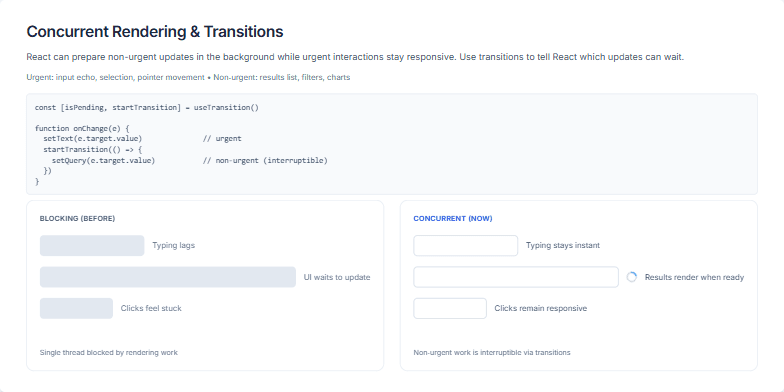
This slide explains how React's concurrent rendering feature helps maintain a smooth and responsive user interface during intensive updates. It contrasts the old blocking rendering behavior, where long updates would freeze the UI, with the new concurrent approach. With concurrent rendering, urgent updates like text input and user interactions are prioritized while non-urgent updates, such as rendering large lists or complex charts, are handled in the background without blocking the main thread. The slide visually illustrates the difference between the two approaches and provides a code example demonstrating the use of `useTransition` to mark non-urgent updates. This allows developers to improve the user experience by ensuring that the application remains responsive even during complex operations.